|
Sections in |
|
Sections in |
I'm Melanie Anne Phillips, your instructor for "Using Dramatica Pro." First off, I'd like to congratulate you on your decision to take this course. By the time you have finished all the lessons, you'll have all the information you need to use Dramatica Pro software to the fullest! In addition, you will have mastered creative techniques to create a riveting plot, compelling theme, memorable characters, and a fully developed, involving genre whenever you write.
Each of the lessons in this course provides a bite-sized piece of information about the features of Dramatica, what they do, and how to use them to create a flawless structure for your story. Some lessons also contain streaming video and audio, essays on aspects of story development, exercises to improve your skills, and links to additional writer's resources.
Work on each lesson as long as you like. When you are ready for the next lesson, let us know by return email and we will send it to you.
Again, congratulations on taking this first step on the road to mastering Dramatica Pro. And now, it's time to begin your first lesson.
Introduction to Dramatica Videos
These videos are taken from the Dramatica Software Companion CD ROM which has over 4 1/2 hours of narrated screen shots describing all the key features in Dramatica and how to use them creatively.
Many of the lessons include videos from the Software Companion and newly videos produced videos as well.
If you do not have the latest version of Real Player installed on your computer, you can download a free copy at http://www.real.com.
Play Videos:
Introduction to Using Dramatica Creatively
The name "Dramatica" actually stands for two things - a revolutionary new theory of story and a line of software products that implement the theory as story development tools for writers. Although you don't need to know the theory before using Dramatica, there really is no way to avoid it in the software, as every question and every major feature is designed to help you apply the theory to your story.
Fortunately, the software is designed to deal with only one story point at a time. So, you only need to learn the theory behind the aspect of your story you are working on at the moment. In this way, you never have to put aside the creative effort to first learn some abstract concept. Rather, you learn as you go, as part of the process of creation.
Of course, every software product has purely mechanical functions which must be learned, like opening features and navigating from place to place, and Dramatica is no exception. In this course you'll learn about every major feature in Dramatica Pro, and also learn how to apply them efficiently and creatively.
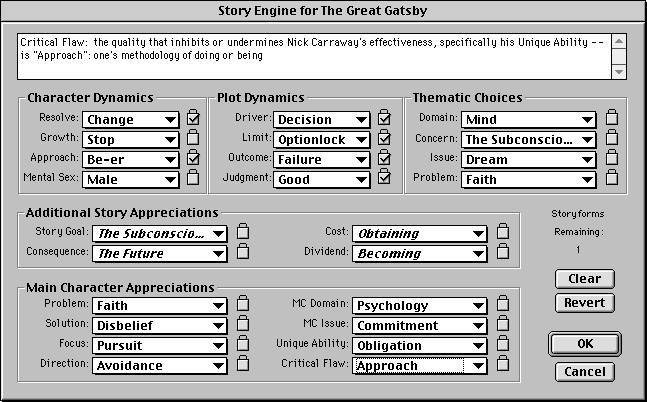
At the heart of Dramatica is a feature called the "Story Engine." The Story Engine is where the Dramatica theory does it work in the software. Essentially, all the story points and dramatic relationships that are spelled out in the theory are programmed into a "black box." As an author answers questions and uses features in Dramatica, the Story Engine cross-references those dramatic choices, and uses the theory to find holes and inconsistencies in the structure. It can also predict what is needed to complete the structure, thereby providing a guideline for how to proceed in story development.
Surprisingly, while different versions of Dramatica are between 5 and 10 meg in size, the code that runs the heart of the Story Engine is only about 30K in size! That's because it runs kind of like a Rubik's Cube. You may recall that puzzle/game that was a cube made of 27 little cubes, 3x3x3. You twist and turn it to try arrange the little cubes so that the big cube has only one color on each face or side. With just 27 pieces, it creates something like 40 trillion trillion combinations.
Dramatica' Story Engine works similarly, but in reverse. It's "cube" starts out with one color on each side - a perfectly balanced story in which there is no dramatic tension at all. With each question or function an author applies, the Story Engine cross-references the impact on all other previously-made choices, and then twists that cube (figuratively speaking) to show the results of their collective effect. This creates a pattern of dramatic tension that represents the structural foundation of that particular story.
In a sense, the Story Engine allows the author to accurately "wind-up" the tension in a story the same way one would wind up a clock. Once the key is turned as far as it can go, the Story Engine outlines how the story needs to unfold, based on the kinds of tensions involved.
Stories are about Structure and Passion. The structure acts like a "carrier wave" in radio or television. When done properly, it is invisible, simply serving as a means of broadcasting passionate subject matter from author to audience or reader. But when it is done poorly, it adds static to the signal, and if it falls too far out of tune, the signal may be lost altogether, ending the passionate transmission, and dropping the reader/audience right out of the program.
So, structure is necessary. But for many writers, thinking about structure puts them in a logical frame of mind, and thereby grinds their creative inspiration to a halt. Since Dramatica is all about structure, it is easy to get stuck in that analytical mind-set, and stop dead in your creative tracks.
Fortunately, there is a completely passionate way to approach Dramatica that puts the Muse first, and the Mechanic second. As we proceed through this course, you'll learn a whole new way of approaching Dramatica, other than the ones suggested in software itself. In fact, by ignoring Dramatica's guidelines for how to use the software, you will be able to maximize your creative flow, even while ensuring a sound structure.
Exercise One: Say Hello to Dramatica
1. Open your Dramatica Pro software. The first screen that opens should have 12 "tiles" arranged in a grid pattern called the Dramatica Desktop. Each tile links to a different part of the program. Click on each tile to see where it goes. Then, return to the Dramatica Desktop. Click on the thumbnail picture at right to see a full-sized view of the Dramatica Desktop.
2. The tiles are not the only way to navigate around the software. Along the top are the words, "File, Edit, Storyforming, Character, Storytelling, Tools, Window, and Help." Click on each word in turn and look at all the options available. Some options are only available through these "menu items," and can't be reached through the tiles. So, in your approach of Dramatica, don't just hide in the tiles - get out and explore a little.
3. On the main Dramatica Desktop, click on the tile labeled "Story Engine." The Story Engine presents several of the more "popular" story points that the software tracks. Originally, the Story Engine window was called the "Control Panel" because you could have the most impact on your structure by making choices here.
The Story Engine is really just for expert users, since it doesn't have any help or instructions, but right now we're just going to get a feel for how Dramatica cross-references your dramatic choices. Notice how all the little boxes say "either" or "any." That is because no choices have been made, so the Story Engine can't yet predict anything.
Now, go to the group of story points at the lower left that are under the heading "Main Character Appreciations. Click on the word "any" that appears to the right of the story point called "Problem." A menu will open up with 64 potential Main Character problems listed. Choose any one of the problem you like by moving your mouse over the menu until you highlight the one you want. Then click once and that problem will be selected.
Look at the words that appear in all the boxes. Some may still say "any" or "either," but some have now changed to say things like "any of 5" or "any of 11." Because you have made a dramatic choice as to the type of problem plaguing your Main Character, the Story Engine has calculated that some other combinations of story points won't work well with that problem. So, it has limited the remaining options based on the choice you made.
Next, go to the story point called "Critical Flaw" in the lower right hand corner and click on the box to the right (which should say "any of 16"). Select a critical flaw from the men as you did before. Now look at the words in all the other boxes. They have been further limited because the Story Engine has cross-referenced the impact of both story points you have chosen upon one another.
Depending on the choices you made, some of the boxes may even have only one choice remaining, in which case, that one choice will show up as an italic word in its story point box. The Story Engine calculates these relationships for every structural choice or function you do in Dramatica. It ensures that you are always building a sound structure for your story.
Copyright 2003 Melanie Anne Phillips
Want More? Try ANOTHER sample lesson for FREE!
Visit http://storymind.com for tips, tricks, techniques, and tools for writers
|
Get the Writer's
Survival Kit Bonus Package
|